


In software development and testing, efficiency and collaboration are essential for success. At SIPSA, we believe in adopting practices that optimise the testing process, which is why TAST is the test automation tool designed to make automation simple, with features that help maximise efficiency and test coverage.
Here are two of TAST’s many features that maximise the efficiency of software testing: TAST gates and repositories.
These features offer flexible and powerful solutions that save you time while improving test quality and consistency.
What is a gate?
In TAST, test cases are defined with UML sequence diagrams detailing the step-by-step process. A gate is a diagram nested inside another diagram.
How to Create a Gate?
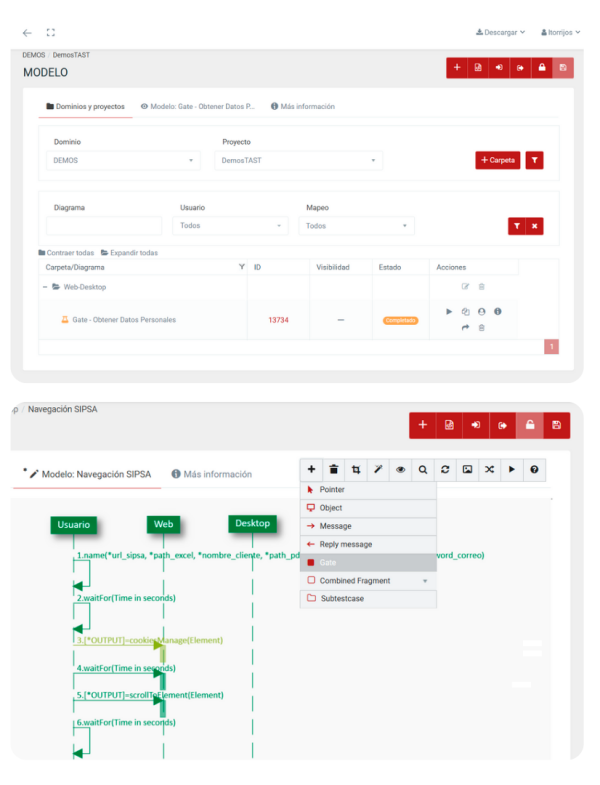
- Publish the diagram: first, publish the diagram you want to use as a gate at project or domain level.
- Select the gate: in TAST, select the option to create a new gate
- Draw the gate: insert the gate into the main diagram.
- Configure properties: define the properties of the gate, including the domain and the corresponding project.
Example: Gate URL
To illustrate how a gate works, let’s consider a test case that consists of automatically opening 100 different websites and capturing a screen shot of each one to verify that it loads correctly.
- Gate GUI: we use a diagram that captures the screen of a website and convert it into a gate.
- URL Loop: we insert this gate in a loop that accesses an Excel file where the 100 URLs are registered, opening them successively and capturing the screen of each one.
This gate can be reused in any other diagram that needs to take screenshots of a website, ensuring that any change in the gate is reflected in all the diagrams that contain it.
Benefits of using Gates
- Efficiency: Gates allow reuse of existing test cases, saving time and effort by avoiding duplication of work.
- Simplicity: They facilitate the simplification of tests, making them more visual and easier to follow.
- Modularity: They encourage modularity in test case creation, adapting easily to iterative development deliveries.
What is a TAST Repository?
A TAST repository is a functionality that allows variables and XPaths to be stored centrally. TAST repositories are YML or TXT files that facilitate the management and reuse of data in automated tests.
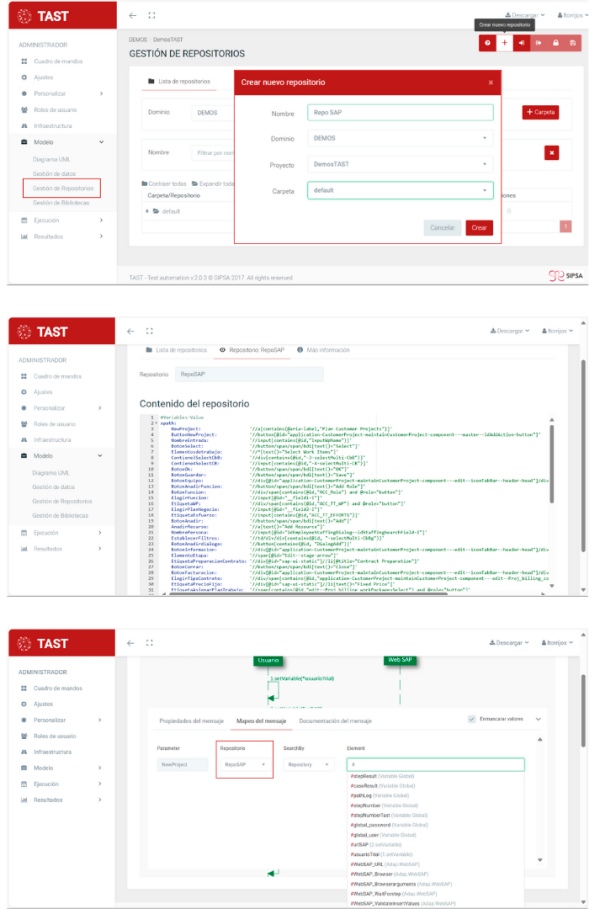
How to create a repository in TAST?
- Repository management: from the Model menu, select ‘Repository Management’. Click on + to create a new repository, defining its name and the corresponding domain/project/folder.
- Write content: write the repository content, such as XPath, CSS Selectors, Ids, etc.
- Link to diagram: ppens the test case (diagram) and links the steps using the repository data.
In TAST, repositories can also be cloned to facilitate the initial configuration process.
Example: SAP Repository
To illustrate the use of a repository, let’s consider an automated test case on the SAP web application. This test case consists of: login, create a project for a new customer, create work packages, assign resources, issue an invoice and change the project has been ‘running’.
This repository stores XPaths and Ids needed to identify and interact with the elements on the web page. If these elements change, it is only necessary to modify the data in the repository, and the changes
Benefits of Repositories
- Centralisation of resources: all information is stored in one place, facilitating access and management.
- Simplified maintenance: updating a resource in the repository will be automatically reflected in all linked test cases.
- Agile testing: resource reuse and centralisation allows for faster and more efficient testing.
Maximise your testing efficiency with TAST
The use of TAST gates and repositories maximises efficiency and improves the structure of automated tests.
Request your TAST demo with no obligation and discover more features that will make your testing team’s work more efficient.




Leave A Comment
You must be logged in to post a comment.