


In the last article we talked about the V-Model, as one of the SQA (software quality assurance) standards used to describe testing activities as part of the software development process. Today we are going to take a closer look at the testing activities described in this model, divided into levels.
Each of them is related to a specific software development phase, as you can see in this picture:

There are two main approaches to test case design:
– Structural or white box. The internal structure of the component is verified independently of the functionality established for it.
Therefore, results are not tested for correctness if they occur. Examples of this type of tests can be executing all the instructions of the program, locating unused code, checking the logical paths of the program, etc.
– Functional or black box. These test that the components that make up the information system are functioning correctly, by analysing the inputs and outputs and verifying that the result is as expected. The inputs and outputs of the system are considered exclusively without concern for the internal structure of the system.
The approach usually adopted for unit testing, the first testing phase set out in the V-Model, is clearly oriented towards the design of white box cases, although it is complemented by black box testing.
1.Unit Testing.
We start with unit testing.
Unit tests are usually performed by programmers, whereby individual units of source code are tested to determine their suitability for use.
These tests verify that the smaller components of the program work correctly.
Depending on the programming language, a component can be a module, a unit, or a class.
Depending on the component type, the tests will be called module tests, unit tests or class tests.
Component tests check the output of the component after providing an input based on the component specification.
The main characteristic of component testing is that individual components are tested in isolation and without interacting with other components. As no other components are involved, it is much easier to locate defects.
Usually, the implementation of the tests is done with the help of a testing framework, e.g. JUnit, CPPUnit or PyUnit, to name a few popular unit testing frameworks.
In addition to functional testing, component testing can address non-functional aspects such as efficiency (e.g. storage consumption) and maintainability (e.g. code complexity).
Unit testing aims at verifying the functionality and structure of each individual component once it has been coded.
Necessary steps to performing unit tests:
– Execute all test cases associated with each verification set out in the test plan, recording their result. The test cases must contemplate both valid and expected conditions as well as invalid and unexpected ones.
– Correct the errors or defects found and repeat the tests that detected them. If deemed necessary, due to their implication or importance, other test cases already performed previously shall be repeated.
The unit test is terminated when all established checks have been performed and no defects are found, or when it is determined that the unit test is discontinued.
2.Integration Testing.
After completing the unit tests, the integration tests are carried out.
The objective of integration testing is to verify the correct assembly between the different components once unit tests have been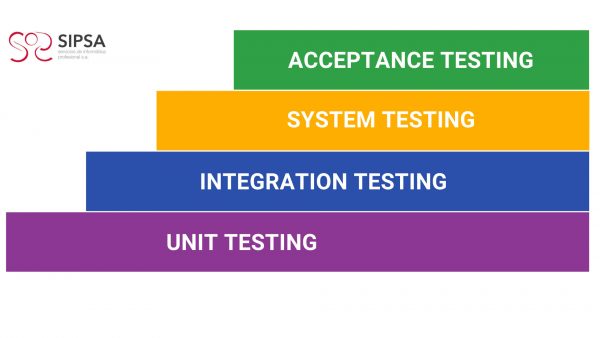 carried out, check that they interact correctly through their interfaces, both internal and external, cover the established functionality and conform to the non-functional requirements specified in the corresponding verifications.
Testing may cover only two specific components, groups of components or even independent subsystems of a software system. Integration testing is usually performed after the components have been tested in the lower component testing phase.
The development of integration tests can be based on the functional specification, system architecture, use cases or workflow descriptions. Integration testing focuses on component interfaces (or subsystem interfaces) and attempts to reveal defects that are triggered through their interaction and that would otherwise not be triggered by testing isolated components.
Integration testing can also focus on the interfaces to the application environment, such as external software or hardware systems. This is often referred to as system integration testing, in contrast to component integration testing.
Integration testing examines the interfaces between groups of components or subsystems to ensure that they are called when necessary and that the data or messages being transmitted are as specified.
Unit testing is often combined with integration testing, as unit testing requires the creation of auxiliary modules to simulate the actions of the components invoked by the component under test, and the creation of components to establish the necessary preconditions, to call the component under test and examine the test results.
The main types of integration are:
- Incremental integration: the next component to be tested is combined with the set of components already tested and the number of components to be tested is progressively increased. With incremental testing, it is most likely that the problems that arise when incorporating a new component or a group of previously tested components are due to the latter or to the interfaces between it and the other components.
- Non-incremental integration: each component is tested separately and then all components are integrated by testing. This type of integration is also called “Big-Bang“.
Integration tests are carried out in the architecture design phase.
3.System testing.
These tests allow the system to be tested as a whole and with other systems with which it is related to verify that the functional and technical specifications are met.
They are intended to verify how the product behaves with reference to the end user and his interaction with the system.
They are carried out when checking that the integration of the systems acts correctly, therefore, the functionality is checked and they must be carried out in an environment similar to the real one, verifying that everything works in accordance with the client specifications and requirements set out from the beginning. This will provide a similar experience to how it will behave in a production environment.
The system testing phase covers the software system as a whole. While integration testing is mainly based on technical specifications, system testing is created with the user’s point of view in mind and focuses on the functional and non-functional requirements of the application. The latter may include performance, load, and stress testing.
Although the components and their integration have already been tested, system tests are necessary to validate that the functional requirements of the software are met. Some functionalities cannot be tested without running the complete software package. System tests often include other documents, such as user documentation or risk analysis documents.
The system test environment should be as close as possible to the production environment. If possible, the same hardware, operating systems, drivers, network infrastructure or external systems should be used, and placeholders should be avoided as much as possible, simply to replicate the behaviour of the production system. However, the production environment should not be used as a test environment, as any defects caused by testing the system could have negative repercussions on the production system.
System testing should be automated to avoid time-consuming manual testing.
Types of system testing:
- Functional testing: ensures that the system correctly performs all functions that have been detailed in the specifications given by the user.
- Communications testing: determines that the interfaces between system components function properly, both through remote and local devices. Human/machine interfaces must also be tested.
- Performance testing: checks that response times are within the ranges set out in the system specifications.
- Volume testing: examines the performance of the system when it is working with large volumes of data, simulating expected workloads.
- Overload testing: tests the performance of the system at the threshold limit of the resources by subjecting it to massive loads. The objective is to establish the extreme points at which the system starts to operate below the established requirements.
- Data availability testing: this involves demonstrating that the system can recover from both hardware and software failures without compromising data integrity.
- User-friendliness testing: this tests the adaptability of the system to the needs of the users, both to ensure that it suits their usual way of working, and to determine how easy it is to enter data into the system and obtain the results.
- Operational tests: checks the correct implementation of operating procedures, including job scheduling and control, system start-up and restart, etc.
- Environment tests: verifies the interactions of the system with other systems within the same environment.
- Security tests: verifies the system access control mechanisms to avoid undue alterations to the data.
4.Acceptance testing.
These tests are aimed at verifying that the system meets the expected operating requirements, as set out in the definition of requirements and in the acceptance criteria, to achieve final acceptance of the system, from the point of view of its functionality and performance, by the user.
Acceptance tests are defined by the user of the system and prepared by the testing team, although the execution and final approval is the responsibility of the user.
The user manager must review the acceptance criteria previously specified in the system test plan and then lead the final acceptance testing.
System validation is achieved by performing black box tests that demonstrate conformance to the requirements and which are set out in the test plan.
Acceptance tests can be:
- Internal, e.g. for a version of software that has not yet been released. This internal acceptance testing is performed by those not involved in development or testing.
- External, performed by the company that requested the development or the end users of the software. In the case of customer acceptance testing, it may even be the responsibility of the customer, in part or in whole, to decide whether the final version of the software meets the high-level requirements. Reports are created to document the test results and for discussion between the developer and the customer. In contrast to customer acceptance testing, user acceptance testing (UAT) can be the last step before the final release of the software. It is a user-centred test to verify that th software actually delivers the intended workflows. These tests can cover aspects of usability and the overall user experience.
Acceptance testing is usually manual and often only a small part of it is automated. But if we think about the arduous work involved in the acceptance testing of numerous versions throughout the software lifecycle or the numerous iterations in agile projects, in the medium and long term, test automation would be the best solution.
This is where TAST , Test Automation System Tool, gains distance from other test automation tools, since:
- As a codeless tool, it facilitates the participation of the end user or client, involving them not only in the acceptance, but also in the whole testing process.
- It is an intuitive tool with a visual interface making it user friendly enabling the user to draw test cases following basic rules and common sense.
This brings us to the goal of software testing:
to achieve the highest quality in order to offer the user an excellent product.
If you found this content interesting, follow us on LinkedIn to stay up to date.




Leave A Comment
You must be logged in to post a comment.