



Best practices for effective bug reporting and optimising bug resolution
In software development, bug reporting is a fundamental part of the quality process. However, it is not enough to identify bugs: it is key to communicate them effectively so that developers can understand, reproduce and correct them in the shortest possible time. A poorly prepared report can delay the solution to a problem, generate confusion in the team and, most importantly, affect the quality of the final product.
With advanced tools like TAST, the error reporting process is streamlined and optimized, eliminating unnecessary manual tasks and ensuring more accurate and accessible documentation. Automation and structured test logging enable more efficient management, making it easier to identify and resolve bugs quickly and effectively.
Keys to effective bug reporting
-
Clearly define the problem
A good bug report should begin with a concise description of the bug. The wording should be clear and direct, avoiding unnecessary technicalities or excessively long explanations.
Example of a bad report: “Error saving form.”
Example of a good report: “Checkout form does not save credit card payment information in the mobile version of Chrome.”
This difference allows the development team to identify the problem quickly and act accordingly.
-
Include reproducible steps
For a bug to be fixed, it must first be understood. If the developer fails to reproduce it, it will be difficult to fix it. It is necessary to provide a detailed listing of the steps leading to the bug, ensuring that all relevant information about the test environment is included.
Example of well-defined reproducible steps:
- Access the checkout page in Chrome version 110 on Android 11.
- Enter the payment details and select “Save card”.
- Complete the purchase and log out.
- Log in again and access the checkout.
- The payment information field appears empty instead of showing the saved card.
With TAST, this process is optimized, as the tool allows automating the execution of these steps and storing the evidence automatically, avoiding human errors and guaranteeing a traceable execution history.
-
Attach visual evidence
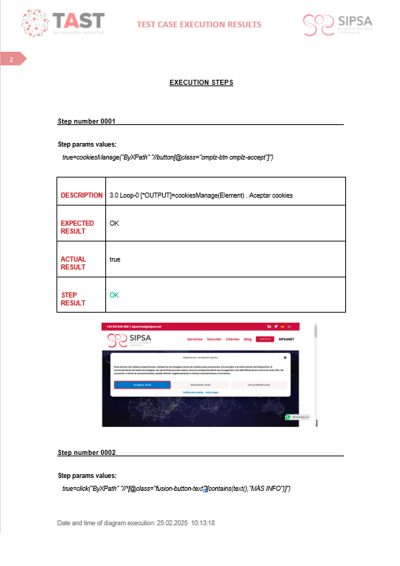

Screenshots, videos and error logs are key resources to speed understanding of the problem. A video showing the incorrect behavior or a system error log can provide valuable information about the cause of the failure.
Example of useful visual evidence:
- Screenshot: The error is clearly shown on the user interface.
- Short video: The process is recorded from the start until the error occurs.
- Error log: screenshot of a log, TAST generates the log automatically for each execution.
With TAST, evidence collection is automated, capturing screenshots step-by-step and uploading them directly to evidence repositories, facilitating error review and documentation.
-
Correctly classify severity and priority
Not all bugs have the same impact. The severity indicates the technical impact of the bug, while the priority defines its urgency within the workflow.
Example of bug classification:
- Critical: A user cannot complete a purchase because the payment button does not respond.
- High: The password cannot be reset, but users can log in with saved credentials.
- Medium: An error message appears with unclear information, but the functionality is still operational.
- Low: An icon does not load correctly in a secondary module of the application.
Correctly classifying bugs helps teams better manage their time and resources, preventing minor issues from blocking the development of critical functions.
- Explain the real impact of the bug
It is not enough to describe what is going wrong; it is necessary to contextualize why it is a relevant problem. It is important to specify whether the bug affects all users or only a specific segment, whether it is present in all versions or only in certain configurations, and whether it affects critical business functions.
Example of a description with clear impact:
“This bug affects 100% of users attempting to complete a credit card purchase on Chrome for mobile devices. As a result, transactions are not completed and the conversion rate has decreased by 20% in the last 24 hours.”
This kind of detail allows the team to better prioritize the resolution of the error based on the impact it has on the business.
Here’s the correction to that part of the article, accurately reflecting what TAST does in the error reporting process:
With TAST, in addition to capturing detailed evidence of each step of the test, a document with the results is automatically generated. Thanks to its integration with tools such as ALM and Jira, bug reports are uploaded in an automated way, ensuring traceability from the initial requirement to the final validation of the test. This allows full control over which functionalities meet the established criteria and which require correction, speeding up analysis and optimizing resolution time.
The role of artificial intelligence in bug reporting
Artificial intelligence tools can be a great help in optimizing the bug reporting process. Some uses include:
- Generating structured reports from simple descriptions, ensuring that key information is not missing.
- Analysis of patterns in reported bugs, allowing to detect trends and prevent recurring problems.
- Automatic severity and priority classification, based on the impact of the bug on the application.
Conclusion
The success of testing depends not only on finding bugs, but also on how they are communicated. A well-structured report facilitates the work of the development team and accelerates bug fixing.
At SIPSA, we have highly trained testing specialists and tools such as TAST to optimize bug identification and documentation. We automate processes, reduce time and guarantee software quality from the very first moment.
If you are looking for efficiency and quality in your tests, contact us.




Leave A Comment
You must be logged in to post a comment.